Memorizing things? You can stop now.
An all-rounder who lives inside Google and can do just about anything. If your company runs on Workspace, she's the partner to welcome in. Notes, organizing, research — you can hand the whole lot over now.
The all-rounder who does everything
Gemi-chan's biggest strength is simple: she can do all of it. Text, images, video, music, code — playing every role at once is something almost no other AI manages right now.

Gemi-chan
Her raw intelligence is already top-tier in the industry. On top of that, her image generation (Nano Banana) is world-class in quality, her video generation (Veo 3.1) turns out cinema-grade footage, and lately she's even taken up music generation. Pair her with NotebookLM — another member of the "Gemi-chan family" — and the quality of your work levels up all over again.
The Gemini 3 Pro line ranks near the top at reasoning, summarizing, code generation and multilingual work. She handles long documents well, so you can trust her with genuinely complex tasks.
Outstanding at partial edits and following instructions. "Change only this bit" actually comes out clean — the new standard for making work assets.
High-quality video with audio baked in. Presentation assets, social ads, internal training videos — striking footage in one shot.
She now handles BGM, sound effects and short compositions as well. Sourcing material for video production is finished entirely inside the AI.
A quick primer in manga form
"So what can Gemi-chan actually do?" If long reads aren't your thing, start with the comic and get the gist.
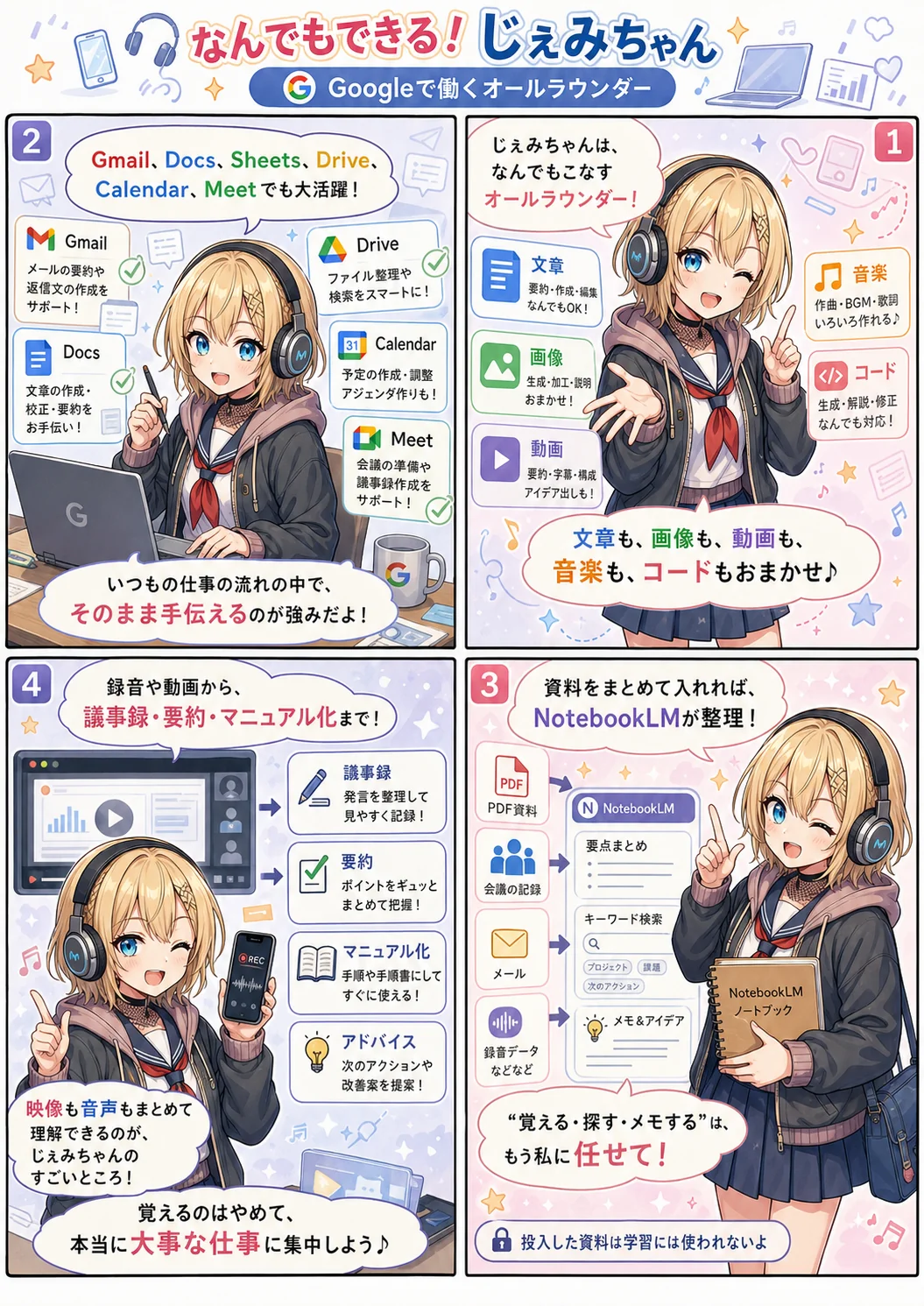
Fully baked into Google Workspace
Gemi-chan is an AI that comes built into Gmail / Docs / Sheets / Drive / Calendar / Meet from day one. If your company already runs Workspace, there's simply no reason not to use her.
Gmail
Summarize incoming mail, draft replies, pull the key points out of a monster thread — all from the side panel.
Docs
Drafting, summarizing, translating, adjusting tone. She'll even wrap up the discussion happening in a shared doc.
Sheets
Generate formulas, aggregate data, spot trends, suggest charts. Data analysis, driven by chat.
Drive
Ask questions across every document in a folder. "Where's that file again?" gets solved in plain words.
Calendar
Auto-adjust your schedule, pull meeting candidates out of your email, even draft the reminder to attendees.
Meet
Real-time transcription, summaries and action items from your meetings. The recording becomes raw material as-is.
No more "open the app, paste it in, write a prompt." Gemi-chan works inside your everyday workflow — that's the real power of Workspace integration.
NotebookLM × Gemini, and your thinking costs drop
Gemi-chan's other face: NotebookLM. Throw a mountain of material at her to organize, and you no longer need to remember any of it. Your brain frees up — that's modern knowledge work.
Remembering, note-taking, searching — leave it to Gemi-chan.
Documents, minutes, emails, PDFs, recordings, video — dump it all into NotebookLM and she'll answer your questions from it. "Who said what in that meeting again?" "What happened with that budget thing in last month's email?" — humans no longer need to hold any of it in their heads.
The crucial part: material you put into NotebookLM is not used as training data. It works purely for organizing and searching. Even sensitive internal documents can be handed over with confidence.
And once it's organized, pass it to the brilliant Gemini proper and you can reshape it however you like. "Organize in Notebook → put it to work in Gemini" — same Google household, so the handoff is seamless.
Feed in a mountain of material
PDFs, minutes, emails, video, recordings — whatever the format, throw it all in together.
NotebookLMGemi-chan, chief organizer
NotebookLM sorts it out
Designed to answer only from your sources. Never used for training — she just focuses on searching, summarizing and structuring.
Put it to work in Gemini
Hand the organized result to the brilliant Gemini and shape it into pitch decks, analysis or drafts.
The material you feed in transforms into all kinds of shapes
PDF, image, video, audio, text — any format goes in, and what comes out is just as varied. Seeing it visually sparks new realizations.
Turn it into slides
Straight from documents to presentation slides. Chapters, headings and key points get extracted automatically, ready to present.
Audio Overview
Generates a podcast-style audio walkthrough with two hosts. Review with your ears on the commute or behind the wheel.
Mind maps
See the structure of your material at a glance. Hierarchies and connections between arguments show up in a way plain text never reveals.
FAQ generation
Likely questions and answers, extracted automatically. The groundwork for a support manual or an internal Q&A, done in one pass.
Timelines
Pulls out events in chronological order and turns them into a timeline, history or process diagram. Perfect for project retrospectives and research reports.
Reports / briefs
Formatted into a chaptered report. Proposals, research briefs and internal write-ups can go out just as they are.
Same source material, but output it from a different angle and the insight changes. Something that never quite clicked as text suddenly reveals its structure as a mind map — that experience becomes an everyday thing.
Load in the documents and you can just ask by chat
Manuals, policies, handover notes, instruction booklets — this is how you turn "you have to read it to know" into "ask and it answers".
Handover documents
Feed in your predecessor's minutes, procedures and notes wholesale. Even with them gone, you can ask the chat about the fiddly rules and know-how of the job.
Work rules & internal policy
"How many leave days can I carry over?" "What's the parental leave process?" — the stuff that's awkward to ask HR, you can ask a Notebook loaded with the policy documents.
Product manuals
Load the PDF manual for a machine, a piece of software, an appliance. "How do I do this?" gets answered instantly by chat. No need to read the doorstop cover to cover.
Customer enquiries
Load your FAQs, service docs and contracts and she becomes a first-line support AI. A huge weight off your team's shoulders.
Internal knowledge
Gather up past minutes, project files and the company wiki. New hires never have to wonder "who do I ask about this?" — it becomes your in-house library of knowledge.
Study & teaching material
Load textbooks, reference books and lecture notes and get a private tutor. "I don't get this part" can be re-explained from a different angle, as many times as you like.
Genuinely transform your meetings
Minutes, reports, requirement specs — having a human scribble notes and write them up neatly is a McJob (drudge work anyone could do) at this point. Hand it to Gemi-chan and focus on the meeting itself.
📝 Taking notes through the meeting
- Typing frantically while trying to follow the discussion
- Too busy with notes to actually engage
- One to two hours of write-up and summarizing, picked back up another day
- Owners, deadlines and decisions all left vague
🎙 Record it, let the AI organize it
- Just record audio or video and drop it into NotebookLM
- 100% of your attention on the discussion during the meeting
- Minutes, requirement specs and reports output accurately
- Owners, deadlines and priorities all come out structured
Rough audio on a video call? Gemi-chan doesn't mind.
Even audio a human ear struggles with, AI understands regardless of quality. The meeting on a flaky connection, the one where the mic was too far away, the speaker with a thick accent — all the moments where a person would have to ask "sorry, what was that?" get transcribed and summarized without breaking a sweat.
The voice recorder × NotebookLM combination is especially powerful. Leave your phone recording even in an in-person meeting and minutes appear the moment it ends — which also frees you from the "I said / you said" arguments.
This one we'd recommend to every single office worker. The custom of appointing one person as note-taker is officially a thing of the past.
Minutes in an instant
Just feed in the recording and you get discussion points, decisions and to-dos structured by agenda item.
Reshaped into reports or specs
Ask for "this meeting as a requirements document" or "in report format" and it comes out ready to submit.
Your voice recorder becomes a partner
In-person meetings too: just leave your phone recording and the minutes write themselves. No notebook, no memo pad.
Actually focus on the meeting
Freed from note-taking, you can spend your brain on the substance of the discussion. The quality of what you say changes.
Only Gemi-chan can actually "watch" a video
Right now, Gemi-chan is the only major AI that can understand video frames and audio together. This is where she's decisively different from the rest.
Just show her and let her listen — and the answer comes back.
Hand a video to another AI and at best it understands a few frames as still images. Gemi-chan takes in motion and sound as a whole, so she's an AI that genuinely "reads" video.
Form checks for sport, delivery coaching for presentations, turning a cooking video into a recipe, turning a work video into a manual — all the material you'd written off just because it was "a video file" becomes an entry point for knowledge work.
Improving your sporting form
Film your swing, your running, your form and hand it over — she'll point out concrete things to fix. Where a coach can't reach, Gemi-chan stands in.
Presentation and speaking coaching
Feed in a video of your rehearsal. Pace, pauses, intonation, eye contact, gestures — objective feedback on all of it.
Cooking and craft videos into recipes
Hand over a YouTube video and say "turn the ingredients, quantities and steps into a recipe." Visuals and audio combined into a text recipe.
Work videos into manuals
Film the procedure → "make this into a manual." Documenting training material is now a matter of simply pointing a camera at the work.
Keep an eye on An-chan, Gemi-chan's little sister
Another new face from the Google side: Antigravity (An-chan). Under the hood she's Gemini 3 Pro — one of the Gemi-chan family. She's spreading among engineers as an agent-style development environment, so she's worth a look.

An-chan
An-chan is the agent-first development environment Google announced in November 2025. Using her feels a lot like Claude Code (Kuroko) or Codex (Chappy): "write this code", "implement this feature", "fix this bug" — all handled in chat. The difference is that she's designed to run several agents in parallel, each pushing its own task forward independently. The "delegate and wait" style has genuinely taken shape.
Feature work, bug fixes, refactoring, adding tests — she runs it to the finish from natural-language instructions. Squarely on the same footing as the other coding "doers".
This is An-chan's edge. Assign several tasks to several agents at once and each runs independently. A development experience with zero waiting around.
The default model is Gemini 3 Pro, so Gemi-chan's smarts come straight into your dev environment. You can switch to Claude or GPT too.
Still in preview as of 2026, so the desktop app is free to try. If you're an engineer, there's nothing to lose by giving it a spin.
"Gemi-chan, built into Workspace", "NotebookLM, the organizer", and "An-chan, the one who ships the code" — the Gemi-chan family is turning into a line-up that covers your work from the front door to the finish line.
Hand over remembering, note-taking and organizing, and focus on the work that actually matters.
For anyone working in the Google sphere, Gemi-chan is past the point of being a "do I use her or not?" question. She works inside Workspace, NotebookLM becomes external storage for your brain, and she can even read video — a partner who lowers your thinking costs and lifts the quality of your work a notch.